


LinkedIn Lead Generation ads need to be watched like a hawk. Unlike a billboard where you “launch it and leave it”, daily optimization is needed to keep your cost-per-lead (CPL) on LinkedIn low.
Before you dive into LinkedIn Campaign Manager, here’s a few important questions to answer:
Are you prepared for how much LinkedIn ads cost per lead?
LinkedIn is one of the costliest ad platforms. Many small businesses may be used to the cost-per-click of Facebook or Instagram being under $3. But unfortunately, those numbers aren’t possible on LinkedIn.
LinkedIn Campaign Manager has incredible targeting potential if you’re in the right industry. For example, when I was running Pallet’s lead generation campaigns, our clients were non-profit and government officials. Pallet builds shelter villages for people experiencing homelessness. The path to purchase and build the villages was long; most villages cost $250,000+ to set up.
The “Mayor’s Campaign” I ran was my best-performing LinkedIn Lead Gen campaign. Even then, the CPL for the best LinkedIn ad was $75. This was way below industry average according to my LinkedIn rep; leads usually fell around $150 for government officials. Huge difference. Beating the average CPL was great for my budget, but you can see how money drains quickly if you’re acquiring unqualified leads.
How are you tracking your leads?
Knowing where your leads come from and what they see is essential to a professional follow-up. Keeping track of leads can be easy or complicated depending on your customer relationship management (CRM) software.
At Pallet, the sales team used Salesforce. They wanted all the leads to flow into the CRM from LinkedIn without any delay; a couple things needed happen before every ad campaign. I needed to:
- Connect LinkedIn to Salesforce using Zapier
- Set up a campaign in Salesforce to identify the LinkedIn lead generation ads fields
- Test the connection worked (many, many times)
- Fill out a sheet for the sales team so they know which lead got which case study
Each LinkedIn form field (such as First and Last Name, Company, etc.) needed to be linked to a field within Zapier. The data would then flow through to Salesforce, where it would populate within the customer’s new profile in the right fields. Field to field to field.
The sales team would then contact the lead. I often used case studies for lead generation, so the sales team noted the case study name in their follow-up email, and included the download link just in case.
Want to go the very manual route? LinkedIn provides a downloadable spreadsheet of all your leads. How you get them to your sales team is up to you. Or maybe your sales team is just you!
Does the content you’re providing solve a highly-relevant problem?
Your audience is looking for solutions. You’re there to provide them with services or a product. With lead generation, you need to dangle the donut in front of the raccoon to earn a download.
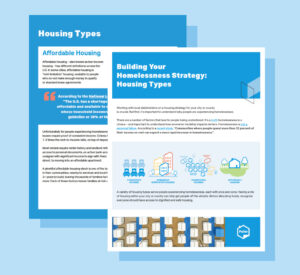
With the previously mentioned “Mayor’s Campaign”, we created a case study called “Building Your Homelessness Strategy: Housing Types.” The government officials and non-profit organizations I targeted in the ads were responsible for solving the unsheltered crisis. But leaders don’t know absolutely everything about homelessness; they’ve got a lot on their plate. That’s where Pallet came in as the subject-matter expert.
Download
The case study I wrote went over the different types of shelter available, and outlined how all of them connect to solve unsheltered homelessness. For Pallet, it was easy to integrate the product into the case study. Pallet shelters (known as a type of transitional housing) fit the gap between congregate, supportive, and affordable housing.
The problem? Government officials need to solve homelessness to serve their constituents.
The solution? A case study teaching officials how to use a mix of shelter models (one of which you can buy from Pallet!) to solve unsheltered homelessness
Who is going to watch your incoming leads?
As much as I’d love to say LinkedIn targets all the right people, no ad platform is perfect.
As I was running campaigns to specific job titles such as “Mayor”, LinkedIn’s algorithm would show them to people outside our key audience. For example, I would see people with manufacturing jobs or who worked for the military. Imagine spending $75 (or worse, $150) on an unqualified lead. It’s rough.
My daily task was to go into LinkedIn every day to look through the job titles of people who filled out our lead generation forms. From there, I would “Exclude” every unqualified job title, industry, or company name. LinkedIn’s algorithm would learn and get closer and closer to our qualified audience.
Who on your team is doing a daily check to make sure money isn’t spent on the wrong people?
Are you testing relevant creative?
With lead generation campaigns, be 100% truthful about what you’re giving in return. Ask: Does the creative represent what I’m sharing with the potential customer? For example, if your “deliverable” is a case study, show a picture of it in the creative. If your deliverable is a free water bottle, the same concept applies.
You should test your creative. Yes, always. To the dismay of marketers like myself, sometimes the “boring” one wins.
With Pallet traffic ads for example, I always requested three versions from the design team:
- One with humans/faces
- One with a photo of the product
- One with a graphic
Guess which would win for Pallet? The photo of the plain white product. Not the one of residents or the one with colorful shelter icons. Testing makes you verify what performs best with your audience.
With LinkedIn lead gen ads, I always showed a square image of the case study. Instead of testing the visual creative, I tested headlines. For example, “Download Case Study: Solving Homelessness” versus “Building Your Homelessness Strategy”. When I first started running lead gen ads, I also tested the button text (“Learn More” vs “Download”). “Download” was my winner.
TLDR: Set up a strategy and team roles before spending $50+ on a LinkedIn lead
Lead generation can easily become an overwhelming job for small businesses if you don’t plan ahead. It takes a lot of people to make ads happen, from a content strategist to a designer to an ad optimization expert. Make sure you’ve got a strategy mapped out before spending your hard-earned money.